◢◢ Sign-up Variants
We now have the ability to show imagery and text specific to a given community on the sign-up pages. We call these "Community variants" and they're managed in JAdmin.
We also have the option to direct new users to any webpage directly after they've completed the pre-boarding, this is managed in the same way/place so will be documented with the variants below.
How to edit the variant for a Community
- Head to the Communities section in JAdmin
- Select the Community you wish to edit
- Find the
campaignDetailssection. This is the home of all of the Community specific sign-up and onboarding images, text and links. - If you're adding
campaignDetailsto a new Community or one that hasn't used this feature before, you may need to create a new entry. If you're editing existingcampaignDetailsyou can skip this step. - You can now add the images and text for the Community (see below for the key)
Notes
- The
valuePropositionXtext entries will automatically format anything to the left of:with Bold type (as the key shows). - For best results the
onboardingUrishould be a fully defined URL (eg.https://justabout.com/...)
Key:
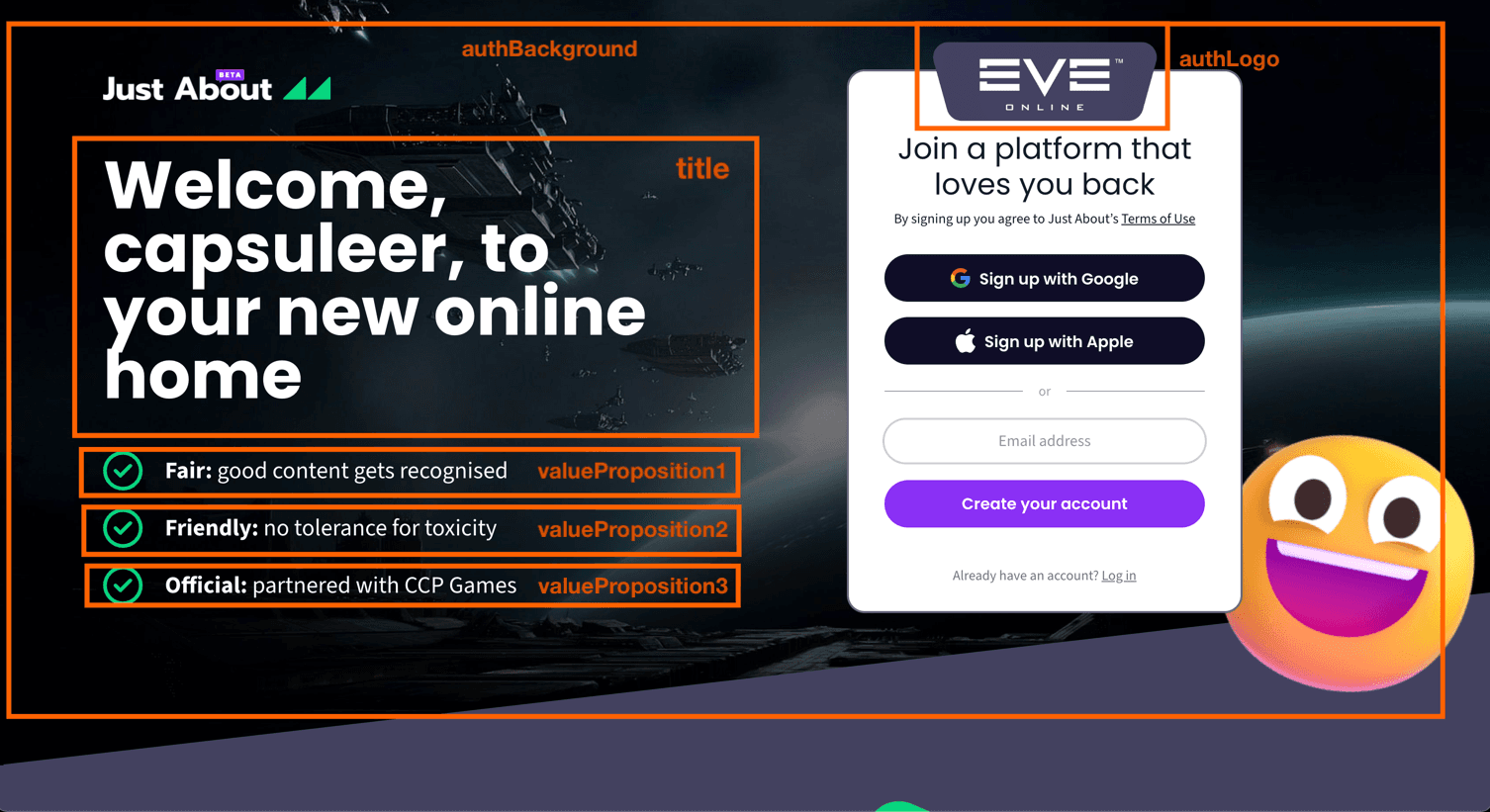
Testing
Once saved, you should open a new private Chrome window and head to https://justabout.com/join?ref=<community-slug>
- Example:
https://justabout.com/join?ref=eve-online